Fixing the Secure Boot error nobody explains - Invalid signature detected
8/24/2026
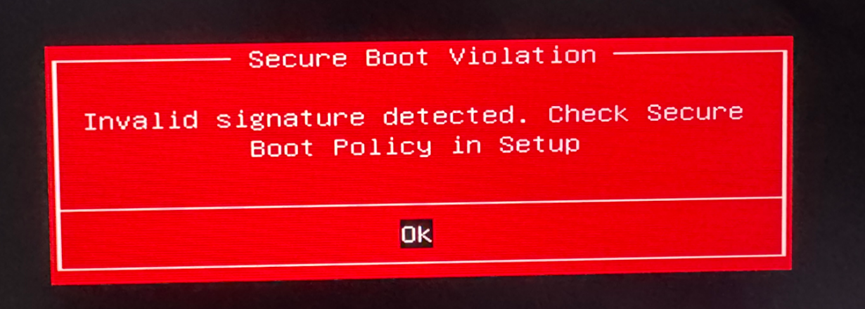
I did what every guide tells you to do. Cleared the keys, restored factory defaults, reset the BIOS. Nothing. Three weeks of that loop, and the only way to boot Windows was to keep Secure Boot off. Which means no Warzone, no Valorant, no anything with a kernel anticheat. It turned out the problem wasn't my keys at all. It's a certificate change Microsoft is rolling out in 2026, and the standard advice actively makes it worse. Here's what's actually happening and the fix that worked on my machine.
What's actually going on??
Secure Boot is simple in principle. Your firmware checks the digital signature on everything it boots, against a trust list stored in the firmware called the db. For over a decade that list has contained one Microsoft certificate that mattered: Microsoft Windows Production PCA 2011. That certificate expires in October 2026. Microsoft's replacement is called Windows UEFI CA 2023, and recent Windows updates quietly swap your boot manager (the bootmgfw.efi file on the EFI partition) for a copy signed with the new certificate. Now the trap. Motherboards made before roughly 2024 have never heard of the 2023 certificate. Their factory default keys only trust the old 2011 one. So after the update, your firmware gets asked to boot a file signed with a certificate it doesn't trust. To the firmware, Windows itself now looks like malware. Red screen. And this is the part that cost me three weeks: "restore default keys" resets the firmware to the 2011-only trust list. The exact state that rejects your updated boot manager. The standard fix is the trap.
Check if this is your problem
Two minutes. Boot into Windows with Secure Boot temporarily disabled, open PowerShell as Administrator, and run:
mountvol S: /s
$s = [Text.Encoding]::ASCII.GetString([IO.File]::ReadAllBytes('S:\EFI\Microsoft\Boot\bootmgfw.efi'))
"Boot manager signed with 2011 cert: " + ($s -match 'Production PCA 2011')
"Boot manager signed with 2023 cert: " + ($s -match 'Windows UEFI CA 2023')
$db = [Text.Encoding]::ASCII.GetString((Get-SecureBootUEFI -Name db).Bytes)
"Firmware trusts 2011 cert: " + ($db -match 'Production PCA 2011')
"Firmware trusts 2023 cert: " + ($db -match 'Windows UEFI CA 2023')
mountvol S: /d
Boot manager says 2023, firmware trust says False? That's the mismatch. That's your whole bug.
The fix
Windows keeps a 2011-signed copy of the boot manager at C:\Windows\Boot\EFI\bootmgfw.efi. We copy it over the 2023-signed one on the EFI partition, then stop Windows from swapping it back.
Quick warning first. If BitLocker is on, back up your recovery key before touching Secure Boot (manage-bde -status C: tells you). And these are boot files, so the usual disclaimer applies: worked on my machine, proceed at your own risk.
In an admin PowerShell:
# 1. Confirm the Windows copy is 2011-signed (don't skip this)
$src = 'C:\Windows\Boot\EFI\bootmgfw.efi'
$s = [Text.Encoding]::ASCII.GetString([IO.File]::ReadAllBytes($src))
if ($s -match 'Windows UEFI CA 2023') { throw "Windows copy is also 2023-signed, see FAQ" }

# 2. Mount the EFI partition and swap the file (keeps a backup)
mountvol S: /s
Copy-Item S:\EFI\Microsoft\Boot\bootmgfw.efi S:\EFI\Microsoft\Boot\bootmgfw.efi.2023 -Force
Copy-Item $src S:\EFI\Microsoft\Boot\bootmgfw.efi -Force
mountvol S: /d

# 3. Stop Windows from auto-installing the 2023-signed one again
Set-ItemProperty HKLM:\SYSTEM\CurrentControlSet\Control\SecureBoot -Name AvailableUpdates -Value 0
Disable-ScheduledTask -TaskName 'Secure-Boot-Update' -TaskPath '\Microsoft\Windows\PI\'
Then reboot into the BIOS and enable Secure Boot. On my ASUS that's F2, then F7 for Advanced, then Security, Secure Boot, Secure Boot Control: Enabled. If Key Management shows empty or zeroed keys, choose "Install default Secure Boot keys". With the 2011-signed boot manager back in place, the factory defaults are exactly what you want now.
Windows booted first try. msinfo32 showed Secure Boot State: On. Warzone launched.
The proper fix, and why it didn't stick for me
There is an officially supported path: teach your firmware the new certificate instead of downgrading the boot manager.
# Adds the Windows UEFI CA 2023 certificate to your firmware's trust list
Set-ItemProperty HKLM:\SYSTEM\CurrentControlSet\Control\SecureBoot -Name AvailableUpdates -Value 0x40
Start-ScheduledTask -TaskName 'Secure-Boot-Update' -TaskPath '\Microsoft\Windows\PI\'
# then reboot twice and re-run the check script above
This is Microsoft's own rollout machinery (the same system behind KB5025885), and on my laptop it genuinely worked. Firmware db showed the 2023 certificate, the new boot manager was accepted, everything green.
For one day.
Then the laptop died on a flat battery, and on the next boot the firmware had quietly wiped its Secure Boot variable store. Key Management showed 0, 0, 0. The 2023 certificate was gone and I was staring at the red screen again. Older firmware (mine is a 2019 AMI/ASUS BIOS) can lose NVRAM on hard power loss, and every reset drops you back to the 2011-only factory list.
So my rule of thumb:
- Firmware from around 2024 onward, or a BIOS update that mentions the 2023 certificates: use the proper fix. It's the future-proof path.
- Older firmware, especially if your keys have ever mysteriously vanished: use the 2011 downgrade. It survives factory resets because it only depends on certificates every firmware already has. Check your vendor's support page for a BIOS update and revisit the proper fix after installing one.
The honest trade-off: pinning the 2011-signed boot manager means you won't get future boot-manager updates that are 2023-only. Windows itself keeps updating normally and Secure Boot keeps doing its job. But once your vendor ships firmware with the new certificate, switch over, because after October 2026 new boot-manager builds will be 2023-only.
Same red screen, different causes
The error just means the firmware rejected some signature. It doesn't say whose. Before assuming the certificate mismatch, rule these out:
- Dual-boot Linux with unsigned GRUB. This red herring cost me days. I had Debian and Parrot OS entries pointing straight at unsigned grubx64.efi files, which throw the identical error if the firmware tries them first. Worse, Linux installs a fallback binary (fbx64.efi) that recreates those boot entries on every boot, so deleting them in the BIOS doesn't stick. If you dual-boot, put Windows Boot Manager first in the boot order, and set up shim-signed in your distro if you want Linux bootable under Secure Boot. Parrot doesn't support Secure Boot at all, so toggle it off for Parrot sessions.
- Desktop with a modified or ancient GPU vBIOS. Unsigned option ROMs trip the same check. Reflash stock.
- A USB stick with an unsigned bootloader plugged in. Unplug and retry.
- Corrupted boot files. Run Get-AuthenticodeSignature against the .efi files on the EFI partition. The Microsoft-signed ones should all say Valid.
For fellow searchers: ASUS ROG Zephyrus S GX701 (GX701GXH, BIOS 308), Windows 11, error text "Invalid signature detected. Check Secure Boot policy in Setup", triggered after the July 2026 cumulative update replaced the boot manager. If this saved your ranked evening, consider liking and sharing it!
Thoughts?
Drop a comment below - it'll show up here once I read it.